Skip to the article content

Full fibre business connection process


Preparing your business for an nbn® Fibre to the premises (FTTP) installation

Experience an installation specifically designed to support Australian businesses when you order nbn Business Service with your nbn full fibre plan through your service provider. 

Ready to join the thousands of Australian businesses already doing great things with nbn’s full fibre? Check your business is eligible and then follow these steps for a smooth connection process.


Five steps to nbn full fibre for business


Your internal setup can play an important role in supporting the faster speeds available on a full fibre connection.

From the age of the equipment you use and where you place it, to the layout of your business, there are a number of factors that may impact your online business operations. 

Ask your provider about your current setup when you order nbn full fibre. They may suggest upgrading your equipment to help optimise your new connection. 

Note: An nbn full fibre installation includes installation of nbn supplied equipment only. 


Compatibility

Your Wi-Fi router location

For best performance, put your Wi-Fi router in an open space where your business uses the internet most. Avoid placing your Wi-Fi router near sources of interference like appliances, in a cabinet or behind thick walls.


Compatibility

Your Wi-Fi router’s age

It's important that your router supports at least Wi-Fi 5 or higher to fully make use of our network wholesale download speeds of 100Mbps or more. If your Wi-Fi router is more than five years old, you may want to consider whether it’s still suitable for your needs.


Compatibility

Wired vs Wi-Fi

Use Ethernet cabling (we recommend CAT 6 or higher) for wired connections to reduce latency and improve reliability. Your Wi-Fi connectivity can be great for redundancy and backup as well as for portable devices like laptops and phones.


Start your connection journey by talking to a participating provider. The installation process on this page is designed for customers who order nbn Business Service+ from their preferred service provider.

That’s because with Business Service we offer business-grade installations through your provider – the great news is that Business Service is included as a part of every nbn Business Plan. Discuss what options are available to you with your preferred provider.


Compatibility

Your installation requirements

Speak to your preferred provider about what your business needs are when connecting to FTTP, like flexible appointments or where you need your nbn equipment installed.


Compatibility

Choose your nbn Business Plan

Our Business Plans accommodate businesses of different industries and sizes. From small startups to growing businesses, we offer wholesale speed options to support your needs.


Compatibility

What’s next?

Your provider will arrange your installation and confirm appointment details. From there, our case management specialists will support you along the way.


You can expect a call from our Business Service Centre within 2-4 business days after your provider places your order. Our business case managers will discuss your order and installation needs with you. 

This helps our technicians arrive prepared with the right equipment so they can ensure your installation goes smoothly.


Discuss any special requirements

These could include things like site and safety instructions, business operating hours, nbn equipment installation locations, or any process questions.


Provide a mobile number

Provide a mobile number for your site contact. They'll receive important appointment updates via SMS from nbn.


Compatibility

Someone over 18 must be present

Someone over 18 must be present to sign off after the installation is complete.


[Upbeat music plays and continues throughout]

[Narrator]

When installing full fibre for your business, the nbn technician will install nbn equipment inside and, in some instances, outside your premises. Drilling or digging may be required, but before any work begins, our business service center will contact you to discuss the installation. If you can't be there on the day, please ensure someone over the age of 18 is on site to approve and sign off the plan.

[Text on screen displayed during narration] *nbn aims to use business-grade technicians; however, on occasions, we may need to route work to a non-business-grade technician in order to meet connect and assurance targets.

When our nbn technician arrives for your appointment, they will go over any installation requirements. They'll review any details discussed with the nbn business service center and confirm the location for the new nbn equipment. Once the plan is agreed upon, we'll request an official sign off before commencing the work. Don't worry, we won't start any installation work until we've received formal sign off from you or your designated representative on the day.

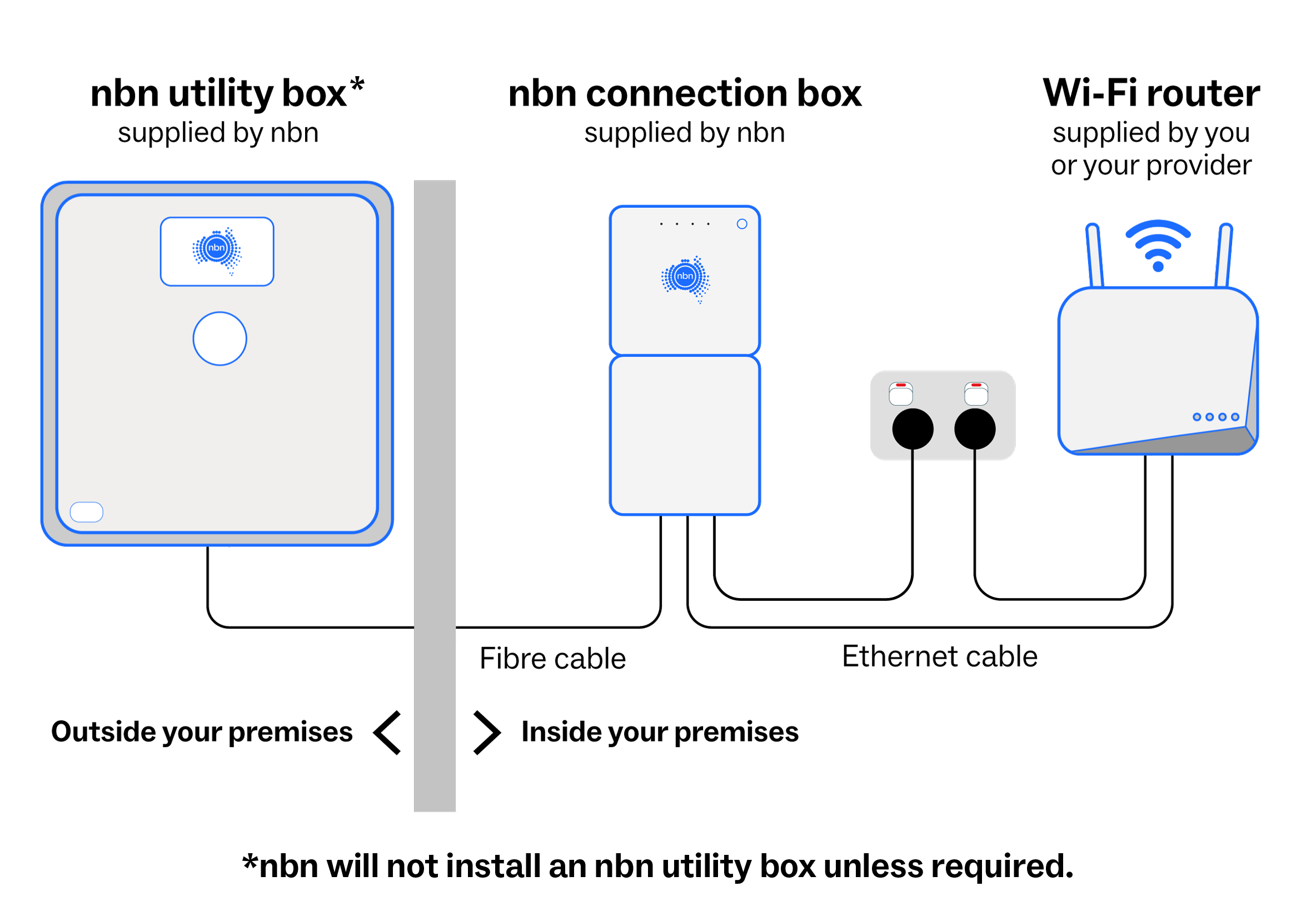
The nbn technician will choose the best install method on the day of the appointment. If an nbn utility box is required, it will be installed outside your premises. It's about the size of a tablet and is usually installed near an existing telecommunications utility box. The nbn connection box will be installed inside your premises. This is the box you'll plug your Wi-Fi router into.

There are certain guidelines that our nbn technicians need to follow when installing the nbn connection box. Firstly, it needs to be placed within 1.2 metres of an existing power point or a safe extension lead provided by you. Secondly, either through a utility box or conduit, the nbn connection box will be installed within a 30 metre radial distance from the premises attachment point. 

[Text on screen displayed during narration] *With an nbn Business Plan with 250Mbps wholesale download speeds or higher, and within the eligible footprint, nbn can extend the placement of your nbn connection box up to 30 metres radial distance from your nbn utility box. For all other speed tiers ordered, including residential plans, we will place the nbn connection box within a 12 metre radial distance. 

If your preferred location isn't possible, the nbn technician will advise you to engage a licensed cabler to provide guidance on nbn installation standards and to install an internal pathway. Alternatively, you can run an Ethernet cable from the nbn connection box to your preferred Wi-Fi router location. Thirdly, it needs to be placed in a safe, cool, dry, and ventilated area.

It cannot be placed under a window that opens in a wet area such as a bathroom or be exposed to weather or

direct sunlight. It can also not be placed in an industrial area such as a washdown zone or a loading dock area. It also needs to be placed away from existing utilities such as gas lines and external water systems.

It needs to be placed somewhere that is easily accessible for both you and nbn technicians. Lastly, if your premises has more than one level, we'll need to install the nbn connection box on the ground floor.

Installation is usually completed within 1 day, but may require your power or internet to be off for 30 to 60 minutes. After installation, your nbn technician will guide you through how the nbn connection box integrates with your business network setup.

[Text on screen displayed during narration] *Your experience, including the speeds actually achieved over the nbn network, may vary depending on factors such as your internet provider, your plan, equipment and whether you are using the internet during busy periods.

We also suggest reviewing your in-premises internet setup to ensure your office can get the most of your nbn full fiber connection. For more information, visit nbn.com.au/optimize.

Your provider will activate your new service and notify you. This may take a few business days. In the meantime, you can continue using your existing nbn service. Now your fast, reliable nbn business full fibre connection is ready to use.

[Text on screen] © 2026 nbn co ltd. 'nbn' and nbn logos are trademarks or registered trademarks of nbn co ltd | ABN 86 136 533 741

[End of transcript]

Our technician will arrive at the appointment time and go over your installation requirements. Once you have approved and signed off the installation plan,  they’ll install your full fibre nbn equipment, which includes:

  • Fibre cabling – this connects this equipment from street to building. Your nbn technician assesses the most practical installation route on the day.
  • An nbn utility box, outside your premises – usually near an existing telecoms utility box if you have one.
  • An nbn connection box, inside your premises – since it’s where you connect your router, its location within your business can affect your overall fibre experience.


Compatibility

Discuss and sign off installation

Your nbn technician will go over your installation plan with you. Once the installation plan has been agreed, we'll get your official sign off and begin work.


Power interruptions

We may need to turn off your power and internet for about 30-60 minutes, so arrange backup power for important devices, machinery or applications, if you need it. You can also discuss with your provider about our after-hours appointment options to minimise disruption.


Keep your business running

If we are unable to complete everything within a day, we'll organise to come back as soon as possible to complete the installation. In the meantime, if you have an existing nbn service, you can keep using it.


Important nbn connection box installation requirements

The nbn connection box must be placed within 1.2 metres of an existing power point or safe extension lead provided by you, and we can install internally up to 12 metres radial distance from your nbn utility box.

If we can't meet your installation requirements within our guidelines, you can also choose to provide your own internal cable pathway for the nbn connection box.


A detailed description of this diagram follows.

A connection diagram showing the nbn utility box, nbn connection box, the Wi-Fi router and how these connect to each other. The utility box is supplied by nbn and installed outside of your premises. The connection box is also supplied by nbn and installed inside your premises. The router is supplied by your provider, or you can source one yourself, and is set up inside your premises. The connection box is connected by a fibre cable to the external utility box. The connection box is connected to the router by an Ethernet cable. Both the connection box and the router must be connected to a power outlet. Your Wi-Fi router connects to your devices. 


Time to unleash your nbn full fibre

After your physical installation is complete, your provider will activate your new fibre service. Typically this will happen on the same day as your installation but it could take longer, depending on your provider. You can continue using your existing nbn service during this time, if you have one.


Monitored connection for 30 days

Once your new fibre service becomes active, we’ll monitor your connection 24/7 for 30 days at a wholesale level to make sure everything is working smoothly, and notify your provider if any issues come up. This ongoing support is all part of the service we offer through your provider.


Optimise your setup for full fibre capabilities

While we keep an eye on things at our end, you can focus on optimising the internet setup at your business. Check out our optimisation guides for business, or speak with your service provider or IT specialist for more help with your internet setup.


[Upbeat music plays and continues throughout]

[Narrator]

Your business is now powered by Full Fibre. Here's how to get the most out of your new connection. 

Once your connection is active, we'll monitor it at a wholesale level 24/7 for 30 days to ensure everything runs smoothly. So that if we detect an issue, your provider can resolve it as quickly as possible for you.

Fast reliable connectivity is essential for future growth. As your business scales, having a network that can keep up means you can innovate, collaborate, and operate with minimal interruption. But did you know that how your internet equipment is set up can also have an effect on your online experience?

Here are tips to make sure your premises is set up for the best possible nbn experience. 

Firstly, check the age of your Wi-Fi router. If it's more than 5 years old, you may want to consider whether it's still suitable for your needs. Check that your Wi-Fi router supports at least Wi-Fi 6 or newer standards to unleash all the speed available on your new business full fibre plan.

To get the most out of your business connection, consider choosing a business grade Wi-Fi router to help support multiple devices and the demand of a growing workforce.

Business grade Wi-Fi routers can be configured to manage traffic within your local network for essential tasks such as video conferencing, online collaboration, and storage. For even greater efficiency, consider an SD WAN enabled network device.

These solutions can help manage how your business connects securely to cloud and online applications. To ensure you can make the most out of your nbn connection, it's important to understand and assess your internet usage and the factors that can influence your nbn connection.

Firstly, consider the number of users and devices, including how many devices are connected at the same time. Secondly, assess the applications that are in use at any time and whether they could be impacting your connection. Third, understand peak usage times and your business's bandwidth requirements, and make sure to choose a plan that supports your business needs with minimal interruptions. 

For fast and reliable internet connection, use Cat 6 Ethernet cables or higher. Consider having a backup Wi-Fi connection for cabled devices in case your cable connection is disrupted.

Lastly, as your business evolves, it's helpful to regularly check that your current setup still meets the needs of  your business. For more helpful tips and materials on how to optimize your business setup, visit nbn.com.au/optimize.

Now your fast, reliable nbn business full fibre connection is ready to use.

[Text on screen] © 2026 nbn co ltd. 'nbn' and nbn logos are trademarks or registered trademarks of nbn co ltd | ABN 86 136 533 741

[End of transcript]


Downloadable guides and brochures


nbn FTTP Installation Guide (PDF 6 MB)

nbn Business Fibre Fact Sheet (PDF 8 MB)

Optimising Your Business Internet Setup Fact Sheet (PDF 1 MB)

nbn Connection Box Fact Sheet for Business (PDF 6 MB)

nbn Business Services Product Overview (PDF 6 MB)

FTTP Cable Pathways Fact Sheet (PDF 1 MB)


NEED HELP?


nbn is a wholesaler, providing a fibre network to your service provider so they can offer internet plans to you in turn. That means you’ll need to speak with your provider for most queries to do with your connection.


When to contact your provider

  • You need help understanding if your existing equipment is compatible with your new nbn full fibre (FTTP) plan.
  • You want to reschedule your nbn full fibre installation appointment.
  • You have questions about your installation or the activation of your plan.
  • If you're having issues with the performance of your new nbn full fibre plan once it's been activated (and have already checked for outages on the nbn outages page).
  • You want to change your nbn speed plan.
  • You need to report missing nbn equipment.
  • You need to report a missing or incorrect address.


When to contact nbn

Remember: nbn supplied equipment is the property of nbn. Please leave nbn equipment behind when moving business premises, as it may not work at your new address.


* Wholesale speeds quoted are not end user speeds. They represent the maximum speeds nbn provides to internet providers. Your experience (including speeds) depends on factors such as your nbn access technology, chosen internet provider, configuration over which services are delivered to your premises, internet plan, usage during busy periods, your equipment, setup and number of concurrent online devices at your premises. nbn Business ~ 1000 Pro: Regardless of the retail service you purchase, the actual wholesale download speeds delivered to providers will be less than 1Gbps due to equipment and network limitations. nbn Business 2000 Pro: Service availability (including timing) will depend on phone and internet providers offering this plan, and is subject to service qualification and only available where network capacity permits.

+ nbn Business Service is not available on the nbn Fixed Wireless or satellite network. Not all providers offer plans based on the full range of wholesale nbn business products, product features and services and availability depends on your access technology and area.