
Scammers often pretend to be from trusted organisations. If someone claiming to be from nbn® has contacted you and something doesn't feel right, there are simple steps you can take to stay safe.
Remember: nbn will never call and ask to access your computer, request payment by gift card, or threaten to disconnect your service.
If you're unsure, hang up and contact your phone or internet provider using the contact details listed on their official website.

What nbn will never ask you to do
Scammers often use pressure, urgency, or fear to convince people to act quickly.
To help you stay safe, remember that nbn will never:
- call you to advise that your nbn connection has been hacked or has a security issue.
- offer unsolicited technical support, a rebate for slow internet speeds, or ask you to run a speed test over the phone.
- ask for payment to secure a connection, appointment, service visit, new modem, or equipment postage.
- call to offer installation of a 5G service.
- call to switch your internet technology unless it's related to a legitimate appointment arranged through your service provider.
- use an automated message (robocall) to tell you that your service will be disconnected.
- ask you to pay using gift cards.
- ask you to take a selfie or photograph of yourself holding your driver's licence, or ask for your Medicare, passport, or other identity document details.
- verify your identity using personal security questions, such as where you went to school or the names of family members.
- offer a paid service to keep you connected during a power outage or natural disaster.
- ask you to install software that allows someone else to remotely access your computer, mobile phone, or other devices.
- threaten to disconnect your service unless you pay a fee, provide personal information, or install software that allows someone to access your device
If someone claiming to be from nbn does any of these things, end the conversation and contact your provider using the contact details listed on their official website.
Be careful with remote access software
Never give an unexpected caller access to your computer or phone.
Scammers commonly ask to download or use remote access tools to gain control of your comuter or phone. These may include AnyDesk, ScreenConnect / ConnectWise, UltraViewer, TeamViewer / QuickSupport, LogMeIn, Zoho Assist, Splashtop, Supremo, Chrome Remote Desktop, Microsoft Remote Desktop, Windows Quick Assist, AnyConnect, and similar tools.
How to verify an nbn worker
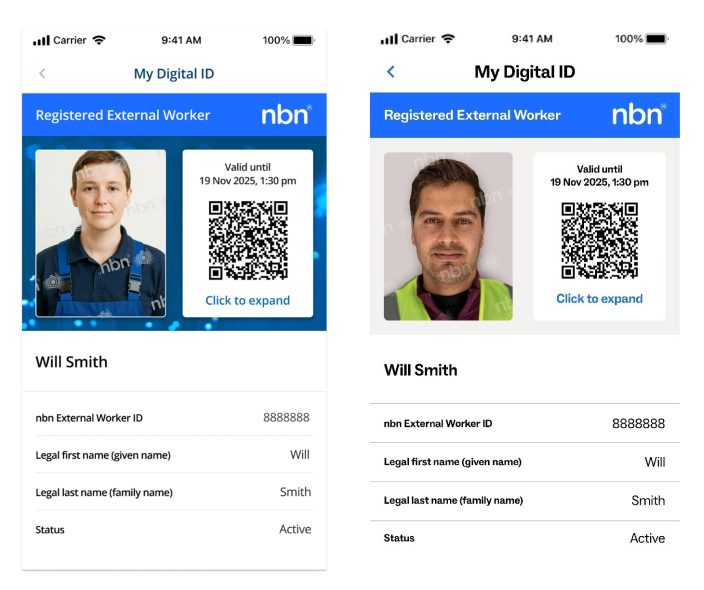
If someone visits your property to carry out work on the nbn network, ask to see their nbn digital identification card before providing access.
Authorised workers carry a digital ID card that includes a QR code. You can scan the QR code to confirm their authorisation is current.
It's good practice to check identification before allowing access to your property. Here are examples of the digital ID cards:
Understanding the role of nbn
The nbn network is a wholesale network.
This means nbn does not directly sell phone or internet services. If you'd like a service over the nbn network, you'll need to choose a phone or internet provider that offers one.
In limited circumstances, nbn may accept direct payment from members of the public for services that have been requested directly by the customer, such as some network infrastructure change applications.
Verifying someone's identity
If someone claiming to work for nbn contacts you to sell an internet or phone service and you're unsure whether they're legitimate:


Buying nbn equipment safely
Only purchase nbn equipment directly from:
- authorised delivery partners
- your phone or internet provider.
Avoid purchasing nbn connection equipment from online marketplaces or unofficial sellers. Equipment sold through sites such as online marketplaces may not be genuine, may not work correctly, or may not connect successfully to the nbn network.
nbn cannot guarantee the authenticity or reliability of equipment purchased through third-party marketplaces such as eBay, Gumtree or Facebook Marketplace.
Additional support and scam resources


More information
You can also access support from:
- IDCARE for free support if you've experienced a scam, identity theft or cyber incident.
- ScamWatch to report a scam and learn about the latest scam threats. Part of the Australian Government’s National Anti-Scam Centre.
- The Australian Cyber Security Centre (ACSC) to report cyber security incidents and get recovery advice.
- Your phone or internet provider for account-specific assistance.

Your device compatibilty
Find out if your devices are compatible with your connection.

Prepare your home to switch
Simple steps to help make your connection process smoother.

How to optimise your experience
Improve your internet setup at home or work to help get the most from your connection.